investigação avançada
Using Obsidian for OSINT: A Complete Guide to Organizing Digital Investigations
Using Obsidian for OSINT: A Complete Guide to Organizing Digital Investigations
Learn how to use Obsidian to organize your OSINT investigations, map entity relationships, and enrich your data without ever leaving your workspace.

Lucas Antoniaci
CTO of Sherlockeye

Who has never been in this situation? You're conducting a digital investigation and got fed up with the amount of data you already acquired, so many details scattered across multiple files, websites, and so on. It is in that moment that you realize how hard it is to maintain organization and logic.
That's where Obsidian comes in handy, a faithful helper for organizing your findings and thoughts.
Maybe you already know, but for the starters, Obsidian is a free note-taking tool that stores everything locally on your device. No cloud, no subscriptions, no data leaving your machine. But what makes it really special for OSINT is its linking system, where every note you create can connect to another, and over time those connections build a beautiful visual map of your entire investigation.
Step 1: Installing Obsidian
Obviously first you need to have it installed on your machine, you can get it right here. After that you don't even need to create an account! Just give it a try, have some fun with it to understand its basics, like creating a note, linking notes and giving a look into the Community Plugins (there are a lot of them!).
Step 2: Creating a new Vault
Now the actual work starts, there isn't a real rule on how you should organize your intel gathering, but I will give you some suggestions. First, the optimal way is to create a new Vault.
Give the name that you want, use your creativity! As this is a fictional case, I will go with johndoe-2026.
Step 3: Creating Notes
Okay! Now we can create the actual notes, these notes are responsible for storing everything we have so far for our investigation. I always like to divide it in "Entities" like, a person, accounts, companies, and so on. For our initial notes I created these:
John Doe
John Doe is a suspect in a cyber attack that took place in 2023 targeting [[Foo Bar Company]], in which approximately 2 million users had their data breached. He was identified through an anonymous tip sent to the company's security team via the email address [[johndoe@gmail.com]].
johndoe_tech
This username was discovered through Google Dorks and is associated with [[johndoe@gmail.com]].
johndoe@gmail.com
Email address linked to [[John Doe]]. This address was used to send an anonymous tip to the security team of [[Foo Bar Company]] following the 2023 data breach.
Foo Bar Company
Foo Bar Company is a mid-sized SaaS company founded in 2015, headquartered in San Francisco, California. The company operates through its domain [[foobarcompany.com]] and provides cloud-based project management software to over 500 enterprise clients worldwide. In 2023, the company suffered a major data breach that exposed the personal information of approximately 2 million users, including names, email addresses, and encrypted passwords. The incident was reported to authorities and triggered an internal security audit.
Keep in mind that here I'm using [[]], that is very important when writing notes as it allows the relationship to be created with another note.
Graph
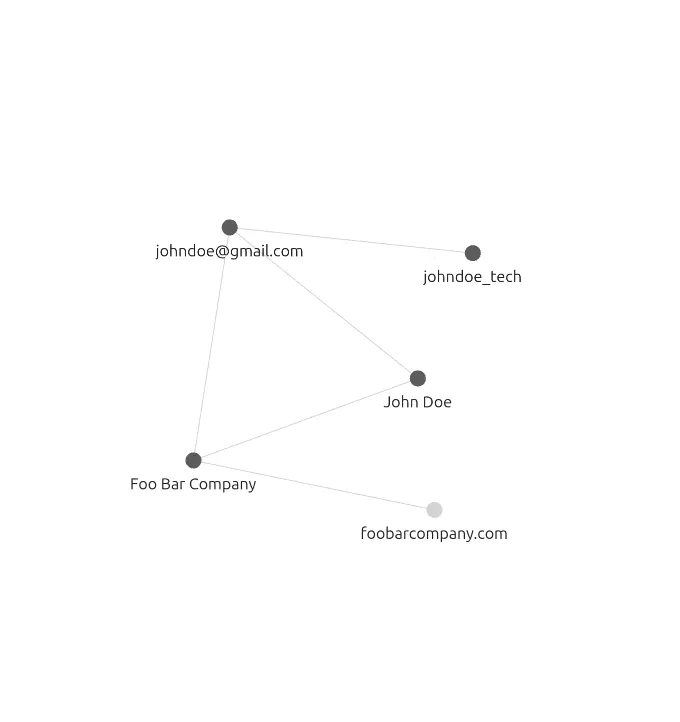
Now that we have everything in place here comes the graph view, that will allow us to see very clearly the relationship between our notes and what we have so far, making it much clearer where we can pivot next.
Canvas
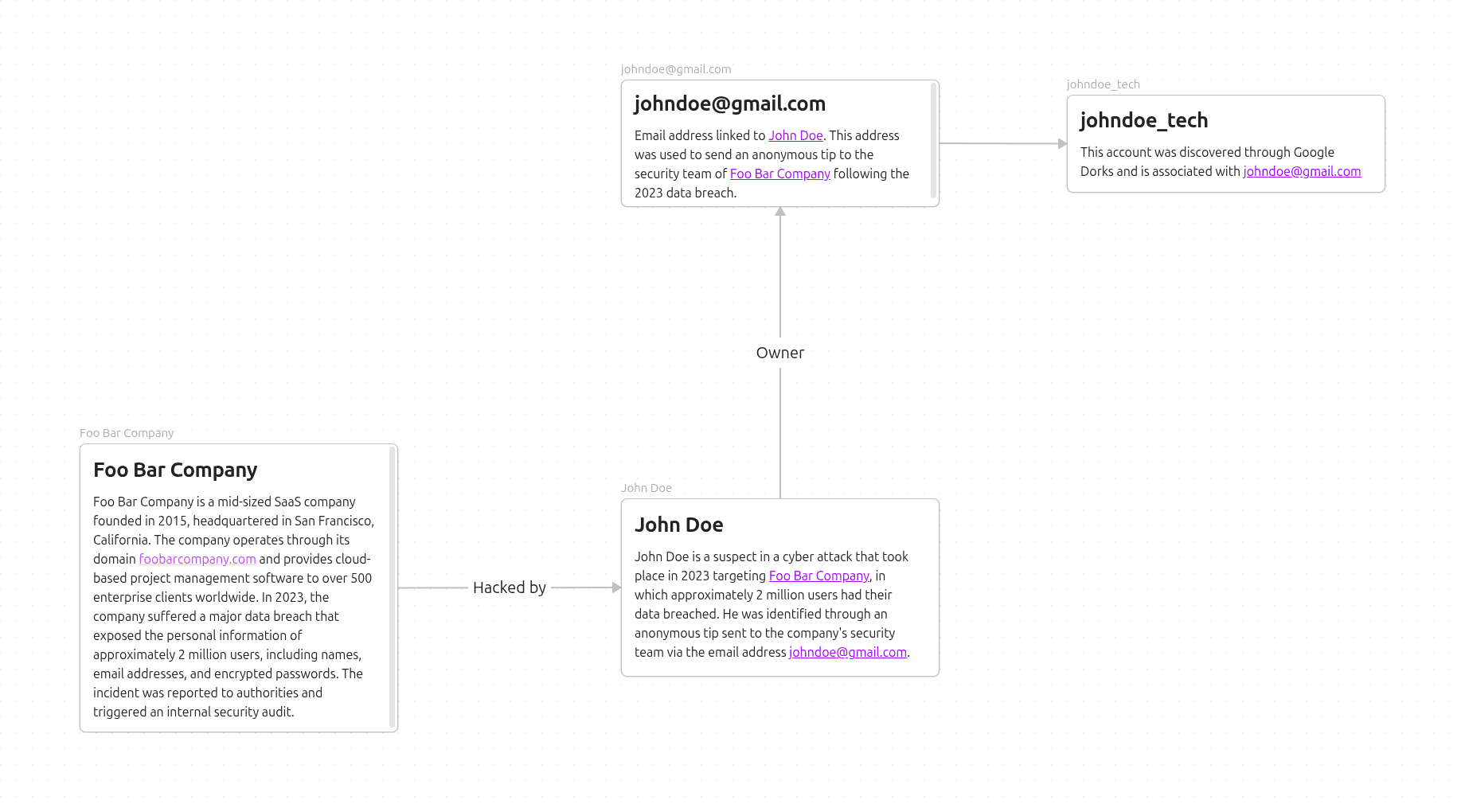
Additionally we also have the canvas, that will allow us to create a more free-form flow with any media or notes that you already have in your Vault. As an example here I created one to show our current investigation.
Community Plugins
You already saw the basics, but we can go even further. Obsidian has a library of 3000+ plugins, ranging from themes and UI changes to full integrations. For OSINT specifically, plugins can become a serious force multiplier in your workflow.
Data Collection with Sherlockeye
One plugin I highly recommend is Sherlockeye OSINT, which integrates the Sherlockeye API directly into Obsidian, making data collection possible without ever leaving your workspace.
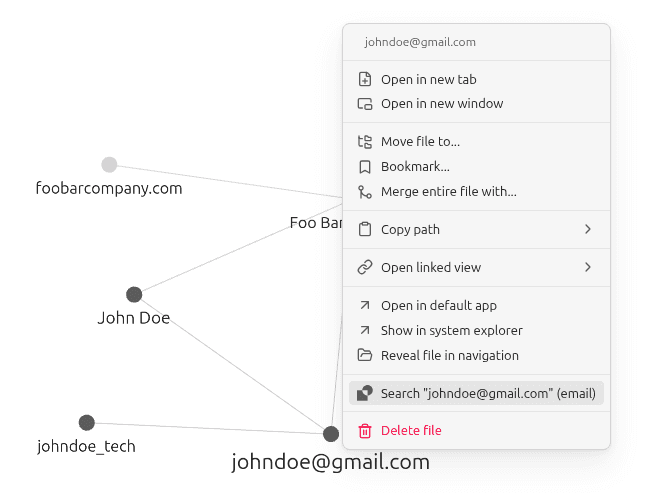
After installing the plugin and setting up your API Key, all it takes is to right-click on the identifier you want to enrich. Give it a look:
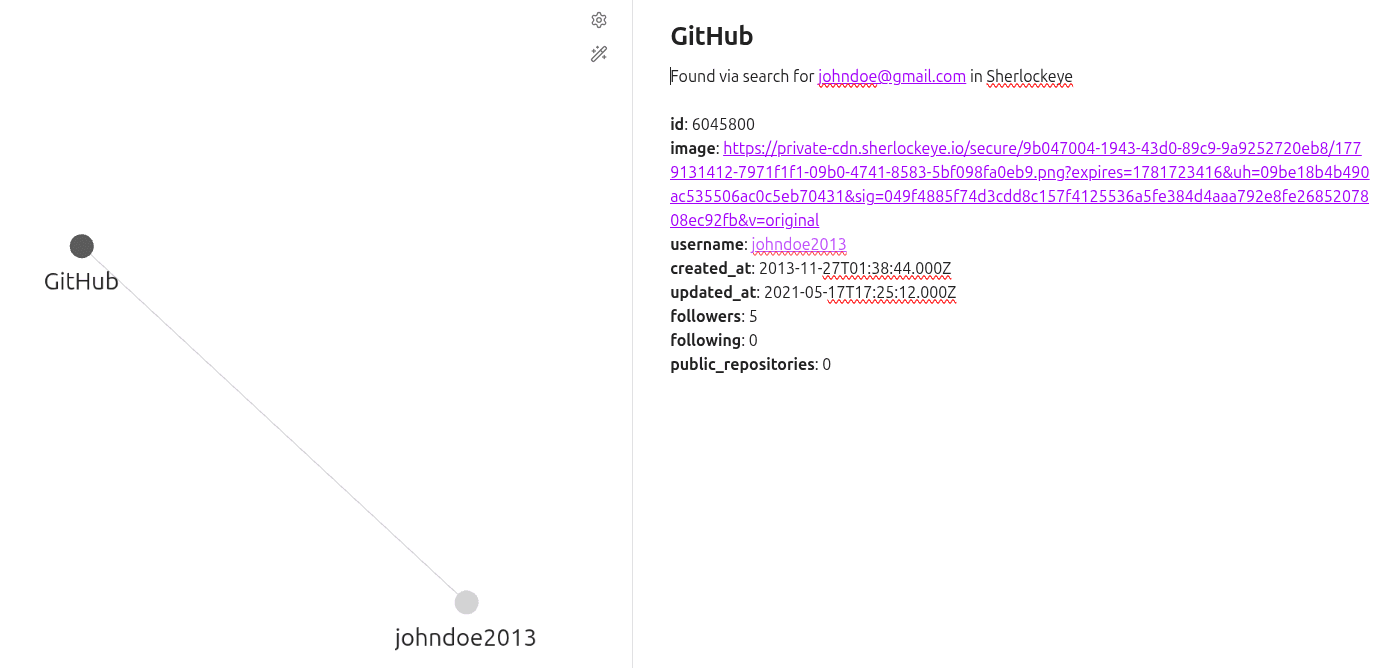
And Voilá! Just like that, a bunch of results are now visible in our graph, making data collection so much faster.
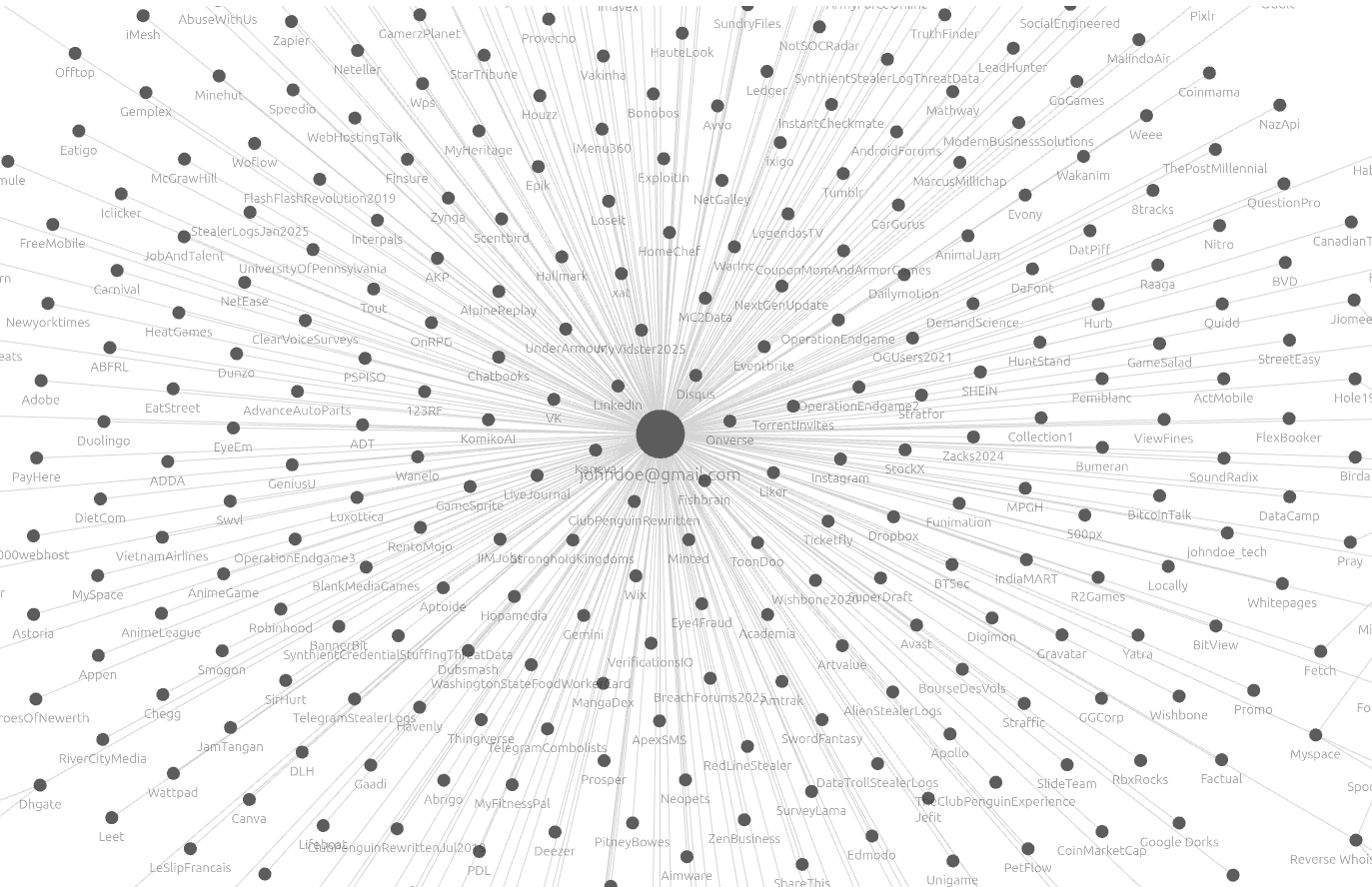
You can also see that each account found receives a child node for username, names, emails and other details, allowing quick pivot.
Recommendations
Here I showed you a simple starting point for organizing your investigation and enriching your data with Sherlockeye, but there is much more you can explore. Here are some great resources to go deeper in Obsidian:
Who has never been in this situation? You're conducting a digital investigation and got fed up with the amount of data you already acquired, so many details scattered across multiple files, websites, and so on. It is in that moment that you realize how hard it is to maintain organization and logic.
That's where Obsidian comes in handy, a faithful helper for organizing your findings and thoughts.
Maybe you already know, but for the starters, Obsidian is a free note-taking tool that stores everything locally on your device. No cloud, no subscriptions, no data leaving your machine. But what makes it really special for OSINT is its linking system, where every note you create can connect to another, and over time those connections build a beautiful visual map of your entire investigation.
Step 1: Installing Obsidian
Obviously first you need to have it installed on your machine, you can get it right here. After that you don't even need to create an account! Just give it a try, have some fun with it to understand its basics, like creating a note, linking notes and giving a look into the Community Plugins (there are a lot of them!).
Step 2: Creating a new Vault
Now the actual work starts, there isn't a real rule on how you should organize your intel gathering, but I will give you some suggestions. First, the optimal way is to create a new Vault.
Give the name that you want, use your creativity! As this is a fictional case, I will go with johndoe-2026.
Step 3: Creating Notes
Okay! Now we can create the actual notes, these notes are responsible for storing everything we have so far for our investigation. I always like to divide it in "Entities" like, a person, accounts, companies, and so on. For our initial notes I created these:
John Doe
John Doe is a suspect in a cyber attack that took place in 2023 targeting [[Foo Bar Company]], in which approximately 2 million users had their data breached. He was identified through an anonymous tip sent to the company's security team via the email address [[johndoe@gmail.com]].
johndoe_tech
This username was discovered through Google Dorks and is associated with [[johndoe@gmail.com]].
johndoe@gmail.com
Email address linked to [[John Doe]]. This address was used to send an anonymous tip to the security team of [[Foo Bar Company]] following the 2023 data breach.
Foo Bar Company
Foo Bar Company is a mid-sized SaaS company founded in 2015, headquartered in San Francisco, California. The company operates through its domain [[foobarcompany.com]] and provides cloud-based project management software to over 500 enterprise clients worldwide. In 2023, the company suffered a major data breach that exposed the personal information of approximately 2 million users, including names, email addresses, and encrypted passwords. The incident was reported to authorities and triggered an internal security audit.
Keep in mind that here I'm using [[]], that is very important when writing notes as it allows the relationship to be created with another note.
Graph
Now that we have everything in place here comes the graph view, that will allow us to see very clearly the relationship between our notes and what we have so far, making it much clearer where we can pivot next.
Canvas
Additionally we also have the canvas, that will allow us to create a more free-form flow with any media or notes that you already have in your Vault. As an example here I created one to show our current investigation.
Community Plugins
You already saw the basics, but we can go even further. Obsidian has a library of 3000+ plugins, ranging from themes and UI changes to full integrations. For OSINT specifically, plugins can become a serious force multiplier in your workflow.
Data Collection with Sherlockeye
One plugin I highly recommend is Sherlockeye OSINT, which integrates the Sherlockeye API directly into Obsidian, making data collection possible without ever leaving your workspace.
After installing the plugin and setting up your API Key, all it takes is to right-click on the identifier you want to enrich. Give it a look:
And Voilá! Just like that, a bunch of results are now visible in our graph, making data collection so much faster.
You can also see that each account found receives a child node for username, names, emails and other details, allowing quick pivot.
Recommendations
Here I showed you a simple starting point for organizing your investigation and enriching your data with Sherlockeye, but there is much more you can explore. Here are some great resources to go deeper in Obsidian:
