investigação avançada
Tookie-OSINT: What It Is and How the Username Search Tool Works
Tookie-OSINT: What It Is and How the Username Search Tool Works
Tookie-OSINT is a free, open-source tool that scans hundreds of sites for a single username in seconds. This guide breaks down the real commands and flags, how the scanner actually works under the hood, and where it hits its limits once an investigation needs more than a list of matched profile URLs.

Alisson Moretto
Founder of Sherlockeye

What Is Tookie-OSINT
Tookie-OSINT is an open-source, Python-based username scanner maintained by alfredredbird on GitHub, with more than 2,300 stars and 186 forks on the repository. It belongs to the same category of tools as the original Sherlock: you give it a handle, and it checks that same username against a large list of websites, reporting back which platforms have an account under it. The project's own documentation cites a success rate of roughly 80% for correctly identifying existing accounts.
The tool was rewritten from scratch for performance and is actively maintained through GitHub issues, a wiki, and periodic releases. It's worth being precise about what it is not: it is not a breach database, not a people-search engine, and not a background check service. It's a command-line username enumerator, and that distinction shapes exactly what kind of result you should expect from it.
Installation
Installation is done by cloning the repository and running a setup script:
git clone https://github.com/alfredredbird/tookie-osint.git
cd tookie-osint
chmod +x install.sh
sudo ./install.sh
The project also ships a .deb package in its GitHub releases, installable with sudo dpkg -i (filename).deb, and it documents support for Termux on Android and ISH on iOS/iPadOS, both installed via pip install -r requirements.txt followed by python3 brib.py. The tool is optimized for Python 3.12, and reinstalling from scratch, sudo rm -rf /tookie-osint followed by a fresh clone, resolves most dependency issues.
Video Tutorials
The Real Commands and Flags
This is the part that was missing the first time around. Tookie-OSINT ships with a documented set of flags in its wiki, and these are what actually determine what the tool delivers:
-u, --user USER— the username to scan-U, --userfile USERFILE— path to a file containing multiple usernames, one per line-t, --threads THREADS— number of parallel threads (default is 2)-o, --output {txt,csv,json}— output format-p, --proxy PROXY— route the scan through a proxy-W, --webscraper— enables the web scraper-H, --harvest— scrapes additional data from the pages found-D, --delay DELAY— page load delay for the web scraper-a, --all— shows all results, both positive and negative-sk, --skipheaders— skips random user agent rotation-d, --debug— enables debug output
A few practical examples straight from the documentation:
tookie-osint -u alfred
Basic scan, plain text output.
tookie-osint -u alfred -o json -t 10
Same scan, but with JSON output and 10 parallel threads, useful when you need to feed the result into another script.
tookie-osint -U users.txt -o csv
Scans an entire list of usernames from a file and exports to CSV, built for batch investigations.
tookie-osint -u alfred -p http://127.0.0.1:8080 -a
Runs through a proxy and forces the display of every result, including negatives, not just confirmed accounts.
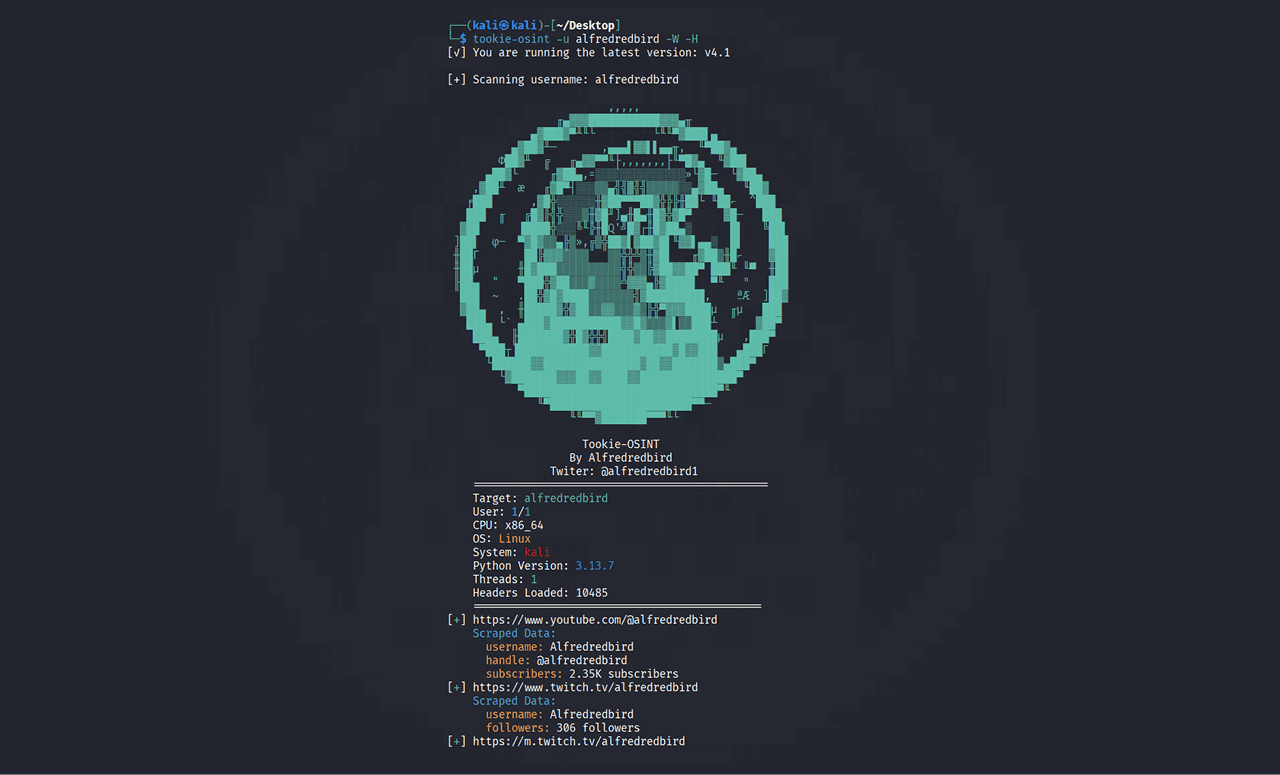
tookie-osint -u alfred -W -H
Enables the web scraper together with harvest mode, which attempts to extract additional data from the profile pages it finds, rather than just confirming the account exists.
That last combination (-W -H) is the closest Tookie-OSINT gets to being a data-collection tool rather than a pure existence check. Even so, what it extracts depends entirely on what each site exposes publicly on the profile page itself; there is no cross-platform correlation layer built in.
How Tookie-OSINT Works Under the Hood
The core mechanism is simple. Most websites generate a predictable URL for user profiles, typically a domain followed by the username. Tookie-OSINT maintains a list of these patterns for a wide range of social networks and forums, builds the URL for the target handle, fires the request, and interprets the response, either by HTTP status code or by a specific page element that only appears when a profile genuinely exists.
With -t controlling thread count, these hundreds of checks run in parallel instead of sequentially, which is the difference between a scan finishing in seconds versus the hours it would take to do the same work manually, site by site. The --skipheaders flag disables random user-agent rotation, a setting normally used for debugging, since header rotation is what helps the scan avoid automated blocking from the sites being checked.
Who Uses It and Why
Individuals run a quick scan when something feels off, a new follower with a generic profile, a dating match who avoids video calls, a stranger reaching out with a story that doesn't quite add up. A username check shows whether that same handle shows up elsewhere with more history and context.
Security researchers and pentesters use username enumeration during the reconnaissance phase of authorized engagements, mapping how much of an organization's footprint is discoverable from public sources alone, often piping JSON output (-o json) directly into other tooling.
Journalists and OSINT researchers use it to verify sources or trace whether an anonymous account has a consistent history elsewhere, or whether it was created for a single purpose.
Compliance, legal, and fraud teams are where a CLI tool like this starts to show its limits fastest. These teams typically need to process volume, dozens or hundreds of usernames per week, with results that are consistent, exportable, and defensible. The -U batch flag and CSV/JSON export cover the mechanics of scale, but nothing in the tool cross-references a username hit against breach data, phone or email attribution, or company records, which is usually where the actual decision gets made.
Step-by-Step Guide: Running a Real Investigation
Collect every known identifier first. Username, known variations, associated email, and any profile photo you have.
Run the base scan.
tookie-osint -u <username> -o json -t 10gives you a fast, machine-readable baseline.Re-run with
-aif the first pass looks thin. By default the tool only shows confirmed hits;-asurfaces negatives too, which is useful for confirming a platform was actually checked rather than skipped.Turn on harvest mode for promising leads.
-W -Hpulls additional page data from confirmed matches instead of just the URL, which saves you from manually opening every profile.Manually verify every match. Open each flagged profile yourself. Enumeration tools produce false positives, especially on platforms that reserve or redirect unclaimed usernames.
Cross-check bios, photos, and account age across matches. A shared username is a lead, not proof that the accounts belong to the same person.
Batch it if you're running more than a handful.
tookie-osint -U users.txt -o csvturns a list of suspect usernames into a spreadsheet-ready output for casework.Move past the username once you've exhausted it. At this stage most real investigations need to bring in other identifiers, breach exposure, phone attribution, domain and company data, image reverse search, which is the point where a platform like Sherlockeye takes over: it queries hundreds of open sources at once across usernames, emails, phone numbers, and domains, and uses AI to reconcile everything into a single profile instead of requiring you to manually stitch together several separate tools and CSV exports.
Log sources and timestamps as you go. For anything with legal or employment implications, screenshot each result, since social content can be deleted at any time.
Red Flags When Interpreting Results
A username that only returns hits on a handful of low-effort platforms, with no presence anywhere mainstream, often signals either a very private person or an identity built specifically for one interaction. Profiles that surface through the scan but were created recently, with no posting history behind them, deserve extra scrutiny. Inconsistent bio details between the matched accounts, different age, city, or job depending on the platform, is one of the stronger signals of impersonation. And a profile photo that reverse-searches to multiple unrelated accounts under different names is a well-documented pattern in stolen or fabricated identities.
Limitations of Tookie-OSINT
Username enumeration only confirms that a handle exists on a platform; it does not confirm identity, activity, or intent. Accuracy depends on how current the site pattern list is, platforms change URL structures and add bot protections constantly, so an unmaintained fork will silently miss accounts it used to catch. The default thread count of 2 is deliberately conservative to avoid triggering rate limits, and cranking -t too high on certain platforms increases false negatives rather than speed. Harvest mode (-H) pulls data per-page, but there is no built-in correlation engine to cross-reference those results against breach records, phone numbers, or company data. And because it's a self-hosted script, there is no encryption standard or data retention policy built in; whatever CSV or JSON output you generate sits on your own machine indefinitely unless you delete it yourself.
When You Need More Than a Username Scanner
For a one-off personal safety check, Tookie-OSINT does the job it was built for. But for fraud, compliance, and legal teams running this kind of check at volume, the gaps become the actual bottleneck: no cross-source correlation, no breach or phone attribution, no built-in data retention discipline. Sherlockeye was built to close that specific gap, querying hundreds of open sources at once across people, companies, phone numbers, emails, and domains, cross-referencing the results with AI into one coherent profile, with every search end-to-end encrypted and capped at a 30-day maximum retention window, the kind of data handling that a self-hosted script was never designed to provide.
Frequently Asked Questions
Is Tookie-OSINT free to use?
Yes. It's fully open-source and free, requiring only a git clone and a few Python dependencies to run from the terminal.
What output formats does Tookie-OSINT support?
Three: plain text, CSV, and JSON, selected with the -o flag. JSON is generally the best choice for feeding results into another script; CSV is better for reviewing batch scans in a spreadsheet.
Can Tookie-OSINT scan multiple usernames at once?
Yes, using the -U flag pointed at a text file with one username per line, which is the built-in mechanism for batch or list-based investigations.
What does harvest mode actually collect?
Enabling -H alongside -W (web scraper) pulls additional data directly from the profile pages of confirmed matches, rather than just returning the URL. What it captures depends entirely on what each individual site exposes publicly.
How accurate is Tookie-OSINT?
The project cites roughly an 80% success rate for correctly identifying existing accounts, though this varies by platform depending on how current the tool's site list is and how aggressively a given site blocks automated requests.
Does Tookie-OSINT cross-reference results with other data sources like breaches or phone numbers?
No. It is strictly a username enumerator. Correlating a username hit with breach exposure, phone attribution, or company records requires a separate tool or a platform built specifically for that cross-referencing step.
Conclusion
Tookie-OSINT does one thing and does it efficiently: it turns a tedious, manual, site-by-site username search into a single terminal command with real batching, threading, and export options. That focus is also its ceiling. The moment an investigation needs more than a list of matched URLs, when it needs correlation across breach data, phone numbers, and company records, handled with actual data retention discipline, a single-purpose scanner isn't the right tool anymore. If that's where you are, Sherlockeye is built for exactly that next step.
Last updated: July 2026 | Reading time: ~11 minutes
Tags: Tookie-OSINT, username search, OSINT tools, digital footprint investigation, identity verification, fraud investigation, people search, cybersecurity due diligence, open source intelligence, background check tools
What Is Tookie-OSINT
Tookie-OSINT is an open-source, Python-based username scanner maintained by alfredredbird on GitHub, with more than 2,300 stars and 186 forks on the repository. It belongs to the same category of tools as the original Sherlock: you give it a handle, and it checks that same username against a large list of websites, reporting back which platforms have an account under it. The project's own documentation cites a success rate of roughly 80% for correctly identifying existing accounts.
The tool was rewritten from scratch for performance and is actively maintained through GitHub issues, a wiki, and periodic releases. It's worth being precise about what it is not: it is not a breach database, not a people-search engine, and not a background check service. It's a command-line username enumerator, and that distinction shapes exactly what kind of result you should expect from it.
Installation
Installation is done by cloning the repository and running a setup script:
git clone https://github.com/alfredredbird/tookie-osint.git
cd tookie-osint
chmod +x install.sh
sudo ./install.sh
The project also ships a .deb package in its GitHub releases, installable with sudo dpkg -i (filename).deb, and it documents support for Termux on Android and ISH on iOS/iPadOS, both installed via pip install -r requirements.txt followed by python3 brib.py. The tool is optimized for Python 3.12, and reinstalling from scratch, sudo rm -rf /tookie-osint followed by a fresh clone, resolves most dependency issues.
Video Tutorials
The Real Commands and Flags
This is the part that was missing the first time around. Tookie-OSINT ships with a documented set of flags in its wiki, and these are what actually determine what the tool delivers:
-u, --user USER— the username to scan-U, --userfile USERFILE— path to a file containing multiple usernames, one per line-t, --threads THREADS— number of parallel threads (default is 2)-o, --output {txt,csv,json}— output format-p, --proxy PROXY— route the scan through a proxy-W, --webscraper— enables the web scraper-H, --harvest— scrapes additional data from the pages found-D, --delay DELAY— page load delay for the web scraper-a, --all— shows all results, both positive and negative-sk, --skipheaders— skips random user agent rotation-d, --debug— enables debug output
A few practical examples straight from the documentation:
tookie-osint -u alfred
Basic scan, plain text output.
tookie-osint -u alfred -o json -t 10
Same scan, but with JSON output and 10 parallel threads, useful when you need to feed the result into another script.
tookie-osint -U users.txt -o csv
Scans an entire list of usernames from a file and exports to CSV, built for batch investigations.
tookie-osint -u alfred -p http://127.0.0.1:8080 -a
Runs through a proxy and forces the display of every result, including negatives, not just confirmed accounts.
tookie-osint -u alfred -W -H
Enables the web scraper together with harvest mode, which attempts to extract additional data from the profile pages it finds, rather than just confirming the account exists.
That last combination (-W -H) is the closest Tookie-OSINT gets to being a data-collection tool rather than a pure existence check. Even so, what it extracts depends entirely on what each site exposes publicly on the profile page itself; there is no cross-platform correlation layer built in.
How Tookie-OSINT Works Under the Hood
The core mechanism is simple. Most websites generate a predictable URL for user profiles, typically a domain followed by the username. Tookie-OSINT maintains a list of these patterns for a wide range of social networks and forums, builds the URL for the target handle, fires the request, and interprets the response, either by HTTP status code or by a specific page element that only appears when a profile genuinely exists.
With -t controlling thread count, these hundreds of checks run in parallel instead of sequentially, which is the difference between a scan finishing in seconds versus the hours it would take to do the same work manually, site by site. The --skipheaders flag disables random user-agent rotation, a setting normally used for debugging, since header rotation is what helps the scan avoid automated blocking from the sites being checked.
Who Uses It and Why
Individuals run a quick scan when something feels off, a new follower with a generic profile, a dating match who avoids video calls, a stranger reaching out with a story that doesn't quite add up. A username check shows whether that same handle shows up elsewhere with more history and context.
Security researchers and pentesters use username enumeration during the reconnaissance phase of authorized engagements, mapping how much of an organization's footprint is discoverable from public sources alone, often piping JSON output (-o json) directly into other tooling.
Journalists and OSINT researchers use it to verify sources or trace whether an anonymous account has a consistent history elsewhere, or whether it was created for a single purpose.
Compliance, legal, and fraud teams are where a CLI tool like this starts to show its limits fastest. These teams typically need to process volume, dozens or hundreds of usernames per week, with results that are consistent, exportable, and defensible. The -U batch flag and CSV/JSON export cover the mechanics of scale, but nothing in the tool cross-references a username hit against breach data, phone or email attribution, or company records, which is usually where the actual decision gets made.
Step-by-Step Guide: Running a Real Investigation
Collect every known identifier first. Username, known variations, associated email, and any profile photo you have.
Run the base scan.
tookie-osint -u <username> -o json -t 10gives you a fast, machine-readable baseline.Re-run with
-aif the first pass looks thin. By default the tool only shows confirmed hits;-asurfaces negatives too, which is useful for confirming a platform was actually checked rather than skipped.Turn on harvest mode for promising leads.
-W -Hpulls additional page data from confirmed matches instead of just the URL, which saves you from manually opening every profile.Manually verify every match. Open each flagged profile yourself. Enumeration tools produce false positives, especially on platforms that reserve or redirect unclaimed usernames.
Cross-check bios, photos, and account age across matches. A shared username is a lead, not proof that the accounts belong to the same person.
Batch it if you're running more than a handful.
tookie-osint -U users.txt -o csvturns a list of suspect usernames into a spreadsheet-ready output for casework.Move past the username once you've exhausted it. At this stage most real investigations need to bring in other identifiers, breach exposure, phone attribution, domain and company data, image reverse search, which is the point where a platform like Sherlockeye takes over: it queries hundreds of open sources at once across usernames, emails, phone numbers, and domains, and uses AI to reconcile everything into a single profile instead of requiring you to manually stitch together several separate tools and CSV exports.
Log sources and timestamps as you go. For anything with legal or employment implications, screenshot each result, since social content can be deleted at any time.
Red Flags When Interpreting Results
A username that only returns hits on a handful of low-effort platforms, with no presence anywhere mainstream, often signals either a very private person or an identity built specifically for one interaction. Profiles that surface through the scan but were created recently, with no posting history behind them, deserve extra scrutiny. Inconsistent bio details between the matched accounts, different age, city, or job depending on the platform, is one of the stronger signals of impersonation. And a profile photo that reverse-searches to multiple unrelated accounts under different names is a well-documented pattern in stolen or fabricated identities.
Limitations of Tookie-OSINT
Username enumeration only confirms that a handle exists on a platform; it does not confirm identity, activity, or intent. Accuracy depends on how current the site pattern list is, platforms change URL structures and add bot protections constantly, so an unmaintained fork will silently miss accounts it used to catch. The default thread count of 2 is deliberately conservative to avoid triggering rate limits, and cranking -t too high on certain platforms increases false negatives rather than speed. Harvest mode (-H) pulls data per-page, but there is no built-in correlation engine to cross-reference those results against breach records, phone numbers, or company data. And because it's a self-hosted script, there is no encryption standard or data retention policy built in; whatever CSV or JSON output you generate sits on your own machine indefinitely unless you delete it yourself.
When You Need More Than a Username Scanner
For a one-off personal safety check, Tookie-OSINT does the job it was built for. But for fraud, compliance, and legal teams running this kind of check at volume, the gaps become the actual bottleneck: no cross-source correlation, no breach or phone attribution, no built-in data retention discipline. Sherlockeye was built to close that specific gap, querying hundreds of open sources at once across people, companies, phone numbers, emails, and domains, cross-referencing the results with AI into one coherent profile, with every search end-to-end encrypted and capped at a 30-day maximum retention window, the kind of data handling that a self-hosted script was never designed to provide.
Frequently Asked Questions
Is Tookie-OSINT free to use?
Yes. It's fully open-source and free, requiring only a git clone and a few Python dependencies to run from the terminal.
What output formats does Tookie-OSINT support?
Three: plain text, CSV, and JSON, selected with the -o flag. JSON is generally the best choice for feeding results into another script; CSV is better for reviewing batch scans in a spreadsheet.
Can Tookie-OSINT scan multiple usernames at once?
Yes, using the -U flag pointed at a text file with one username per line, which is the built-in mechanism for batch or list-based investigations.
What does harvest mode actually collect?
Enabling -H alongside -W (web scraper) pulls additional data directly from the profile pages of confirmed matches, rather than just returning the URL. What it captures depends entirely on what each individual site exposes publicly.
How accurate is Tookie-OSINT?
The project cites roughly an 80% success rate for correctly identifying existing accounts, though this varies by platform depending on how current the tool's site list is and how aggressively a given site blocks automated requests.
Does Tookie-OSINT cross-reference results with other data sources like breaches or phone numbers?
No. It is strictly a username enumerator. Correlating a username hit with breach exposure, phone attribution, or company records requires a separate tool or a platform built specifically for that cross-referencing step.
Conclusion
Tookie-OSINT does one thing and does it efficiently: it turns a tedious, manual, site-by-site username search into a single terminal command with real batching, threading, and export options. That focus is also its ceiling. The moment an investigation needs more than a list of matched URLs, when it needs correlation across breach data, phone numbers, and company records, handled with actual data retention discipline, a single-purpose scanner isn't the right tool anymore. If that's where you are, Sherlockeye is built for exactly that next step.
Last updated: July 2026 | Reading time: ~11 minutes
Tags: Tookie-OSINT, username search, OSINT tools, digital footprint investigation, identity verification, fraud investigation, people search, cybersecurity due diligence, open source intelligence, background check tools
