investigação avançada
Sherlock GitHub: The Complete Guide to Finding Anyone's Digital Footprint in 2026
Sherlock GitHub: The Complete Guide to Finding Anyone's Digital Footprint in 2026
Discover how the Sherlock GitHub tool works for username OSINT in 2026, what it can and cannot do, and when to upgrade to a professional solution for personal safety.

Alisson Moretto
Founder of Sherlockeye

Why Your Digital Safety Depends on What You Can Find About Someone
Every 4.9 seconds, someone in the United States becomes a victim of identity theft. That is less time than it takes to read this sentence. By mid-2025, identity theft reports had already surpassed the entire total filed in all of 2024, with losses growing at an average compounding rate of roughly 27% per year. The FBI's 2025 Internet Crime Complaint Center report documented total online fraud losses exceeding $20 billion in a single year, while imposter scams alone surpassed $1 billion in losses in Q3 2025.
These are not abstract numbers. They represent the person who matched with someone on a dating app, the job applicant who seemed too perfect, the buyer who made an offer on your car, the new "friend" who appeared suddenly in someone's social circle. Behind each statistic is a real person who, at some point, wished they had taken 10 minutes to verify who they were actually dealing with.
That is exactly the problem that open-source intelligence (OSINT) tools like Sherlock were designed to address. Originally built by a developer community and hosted on GitHub, Sherlock has become one of the most referenced tools in the world for tracing a person's username across hundreds of social platforms simultaneously. It is free, transparent, and powerful within its scope. But it also has real limitations that every individual needs to understand before relying on it for personal safety decisions.
This guide explains what Sherlock does, how to use it, where it falls short, and when a more comprehensive solution is the smarter choice.
What Is Sherlock? A Clear Definition
Sherlock is an open-source, Python-based command-line tool hosted on GitHub at github.com/sherlock-project/sherlock. Its sole function is elegant in its simplicity: you give it a username, and it searches for accounts registered under that exact handle across a curated list of social media platforms, forums, and online communities.
The project started as a focused utility and has grown into one of the most widely cited OSINT tools in the cybersecurity community. As of 2026, the tool supports searches across more than 400 platforms, including mainstream social networks, niche forums, developer communities, gaming platforms, and content-sharing sites.
A few things Sherlock is not: it is not an artificial intelligence product, it does not scrape private data, it does not access accounts behind authentication walls, and it does not perform background checks. It is a deterministic, rule-based scanner that checks publicly accessible profile URLs. Its power lies in breadth and speed rather than depth. Understanding that distinction is essential for anyone considering using it for a serious investigation.
The tool is entirely free to download and use. Its source code is open for anyone to inspect, modify, or contribute to. This transparency is one of its greatest strengths and one of the reasons it has maintained a reputation for reliability within the security research community.
How Sherlock Works: The Technology Explained
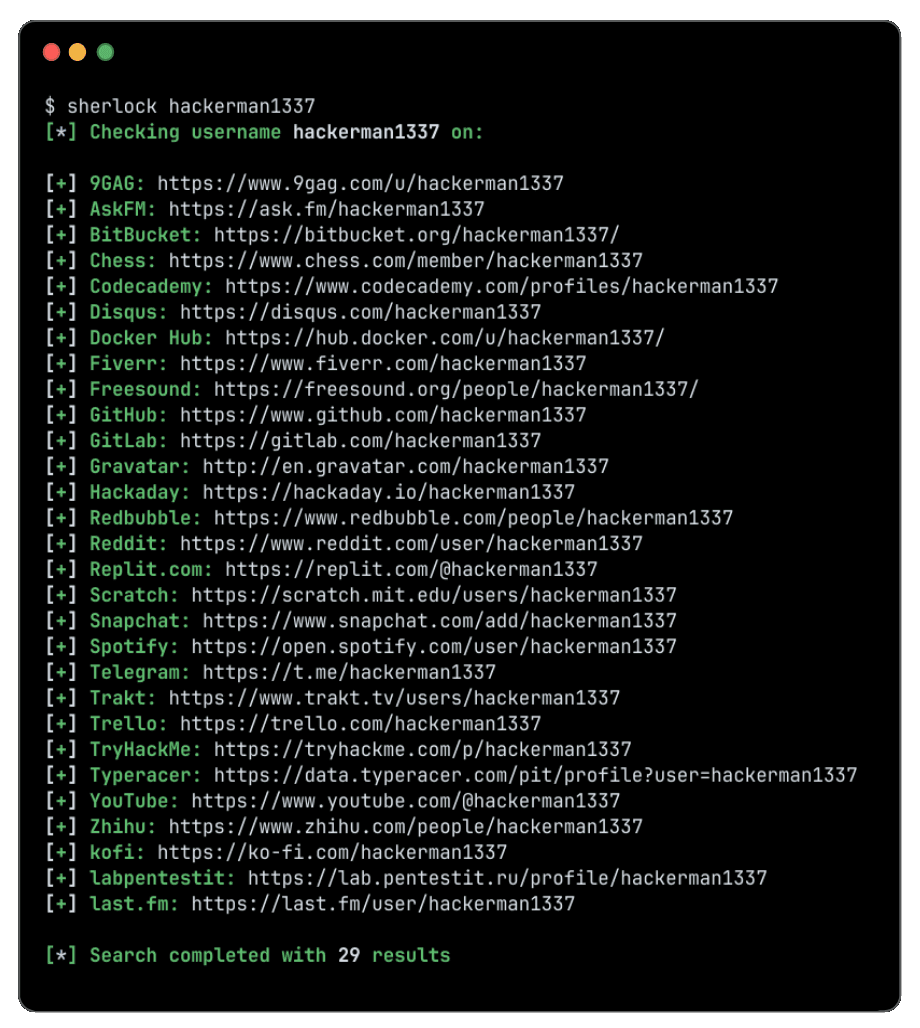
Sherlock's operational logic is straightforward. When you run it with a target username, the tool loops through its internal database of platforms and sends an HTTP request to the expected profile URL for that username on each site. For example, if the username is "john_doe," Sherlock checks whether a URL like twitter.com/john_doe, reddit.com/user/john_doe, github.com/john_doe, and so on returns a valid profile page.
The tool then analyzes the server's response. Most platforms return a standard HTTP 404 status code when a profile does not exist, while an existing profile returns a 200 status code along with page content. Sherlock processes these responses and flags which platforms returned a positive result. Some platforms use less predictable behavior, which is why the community continually maintains and updates the site configuration files to minimize false positives.
Results are printed to the terminal in real time and can be exported in several formats including CSV, XLSX, and JSON for further analysis. The tool also supports Tor routing and proxy configurations for users with specific privacy requirements, and batch processing allows you to search multiple usernames from a text file in a single run.
From a technical standpoint, the approach is a form of username enumeration: the systematic process of discovering where a specific identifier exists across the web. Because most people reuse usernames across platforms, a single identifier can reveal a surprisingly detailed picture of someone's online presence, interests, and social connections.
Who Uses Sherlock and Why
Sherlock sits at an interesting intersection of user groups. The majority of its GitHub stars and community contributions come from cybersecurity professionals, penetration testers, and digital forensics researchers. These users typically run Sherlock as part of broader reconnaissance workflows, often with explicit authorization from clients or within controlled testing environments.
But a growing and equally important segment of users are ordinary individuals. Parents checking whether a new contact is who they claim to be. People who received a text from an unknown number and want to understand who sent it. Individuals who started a new romantic relationship online and want to verify that the person exists in a consistent, coherent way across multiple platforms before meeting in person. Job candidates doing due diligence on a recruiter who reached out unexpectedly. In 2025, social media became the primary fraud contact method for identity theft across most age groups, meaning the people most at risk are the same people using these platforms daily for normal communication.
For this audience, Sherlock represents an accessible entry point into OSINT. It requires no subscription, no account, and no payment. It simply requires some comfort with the command line and a Python environment.
Real-World Use Cases for Personal Safety
The most immediate value of username-based OSINT for individuals comes in a set of very specific, high-stakes situations.
Online dating verification is perhaps the most common personal use case. Romance scams cost Americans over $1.14 billion in 2023, a figure that has continued to climb. A person who claims to be a nurse from Denver but whose username search reveals accounts registered in Eastern Europe, activity on platforms consistent with fraud communities, or simply no digital footprint whatsoever is a person worth being cautious about.
Unknown callers and suspicious contacts represent another significant use case. When someone reaches out through an unexpected channel, a quick username search can reveal whether their stated identity matches the digital trail they have left elsewhere. Consistency across platforms is a positive signal. Its absence is not proof of malice, but it is a prompt for caution.
Brand protection for freelancers and small business owners is a less obvious but practically important use case. Someone using your business name or a close variation of it across social platforms can damage your reputation and redirect your customers. Sherlock helps you find these instances quickly.
Monitoring your own digital footprint is something everyone should do periodically. Running Sherlock against your own username reveals exactly what a stranger could learn about you in minutes. The exercise is often eye-opening for people who assume their various accounts are not easily connected.
Pre-hire screening in informal settings, such as verifying a freelancer found through a gig platform, is another practical application. While formal background checks are the appropriate tool for employment decisions in professional contexts, a basic OSINT search can surface obvious inconsistencies before you share sensitive project information with someone you do not yet trust.
Red Flags That Should Prompt an OSINT Search
Not every new contact warrants a full investigation, but certain patterns consistently signal that a closer look is warranted. Being able to recognize these triggers is a core component of personal digital safety in 2026.
Someone contacts you through an unexpected channel claiming a mutual connection you cannot independently verify.
A person you met online has no verifiable presence on any platform beyond the one where you connected.
A contact's story changes in subtle ways across conversations, particularly details about their location, profession, or family situation.
Someone pushes unusually quickly toward financial favors, gift card purchases, cryptocurrency transfers, or sharing sensitive personal information.
A profile was created very recently but claims a long history of experience or established relationships.
A caller or contact knows details about you that suggest they have researched you, but they provide no verifiable information about themselves.
Someone's username appears on platforms inconsistent with their stated identity, such as a person claiming to be a professional in one country but active on regionally specific forums suggesting a completely different location.
Any one of these signals alone is not definitive proof of a problem. But each is a rational reason to invest a few minutes in verification before proceeding with a relationship, transaction, or meeting.
Step-by-Step Guide: Running a Sherlock Search
Using Sherlock effectively requires a computer with Python installed and some comfort navigating the command line. The following steps apply to Windows, macOS, and Linux systems.
Step 1: Verify your Python environment. Sherlock requires Python 3.6 or higher. Open your terminal or command prompt and run python3 --version to confirm what version you have. If Python is not installed, download it from python.org along with pip, its package manager.
Step 2: Clone the Sherlock repository. In your terminal, run the following command to download the tool from GitHub:
git clone https://github.com/sherlock-project/sherlock.git
This copies the entire project to your local machine. If you do not have git installed, you can download the repository as a ZIP file directly from the GitHub page.
Step 3: Install the required dependencies. Navigate into the directory you just cloned by running cd sherlock. Then run:
pip install -r requirements.txt
This installs the Python libraries Sherlock depends on. The process takes less than a minute on most connections.
Step 4: Run your first search. To search for a single username, run:
python3 sherlock username_here
Replace "username_here" with the actual username you want to investigate. Sherlock will begin querying its full site list and printing results to your terminal in real time. Accounts that exist appear in green; platforms where no account was found are listed without highlighting.
Step 5: Export your results. To save results as a text file automatically, Sherlock creates one in the same directory by default. For CSV or JSON output, use the --csv or --json flags. For batch processing of multiple usernames, create a plain text file with one username per line and use:
python3 sherlock --folderoutput results -f usernames.txt
Step 6: Interpret the results carefully. Finding an account does not prove anything on its own. Look for the overall pattern. Does the person exist consistently across platforms in ways that match their stated identity? Are there accounts on platforms associated with scam activity or content inconsistent with their claimed background? Is the account history recent and sparse, or does it show years of organic activity?
For individuals who need results that go beyond username matching, those that cross-reference email addresses, phone numbers, domain registrations, and public records simultaneously, Sherlockeye provides an AI-powered OSINT platform that automates this deeper layer of investigation. Rather than running multiple manual tools and assembling the picture yourself, Sherlockeye queries hundreds of open sources in parallel and cross-references the results to produce a complete digital profile. For personal safety investigations where the stakes are high, that additional depth is often the difference between a vague sense of unease and a clear, actionable picture.
The Limitations of Sherlock You Need to Know
Understanding what Sherlock cannot do is as important as knowing what it can. Its limitations are not flaws; they are the natural boundaries of what a focused, single-purpose command-line tool is designed to accomplish.
Platform coverage has gaps. While Sherlock covers more than 400 sites, the total number of online platforms where a person could maintain a presence runs into the tens of thousands. Regional platforms, private communities, encrypted messaging apps, dark web forums, and constantly emerging social networks fall entirely outside Sherlock's scope.
Username matching is exact. Sherlock searches for the precise string you provide. A person who uses slight variations of a username across platforms, adds numbers or symbols, or switches handles periodically will produce incomplete results. Human behavior is not consistent, and a determined fraudster will deliberately vary their identifiers to avoid detection.
No contextual enrichment. Sherlock tells you that an account exists. It does not tell you when it was created, whether it is active, what content has been posted, or how it connects to other accounts. Extracting that context requires manually visiting each flagged profile and interpreting what you find.
No cross-referencing with other data types. Sherlock works exclusively with usernames. It does not search email addresses, phone numbers, IP addresses, domain ownership records, or public records databases. A complete personal safety investigation almost always requires all of these data points working together.
Installation and maintenance require technical comfort. For users without a programming background, setting up Python, managing dependencies, and troubleshooting command-line errors creates a meaningful barrier to entry. The tool also requires periodic updates as platforms change their URL structures or response behaviors.
False positives occur. Some platforms return ambiguous responses that Sherlock may flag as a positive result when no genuine account exists. The community works to minimize these through ongoing site configuration updates, but they cannot be entirely eliminated.
Legal and Ethical Considerations
OSINT searches involving publicly available information are legal in most jurisdictions when conducted for legitimate purposes. Sherlock only accesses data that any member of the public can see without logging in. It does not breach, scrape private data, or circumvent authentication. Using it to verify someone's publicly visible online presence falls within the generally accepted scope of open-source intelligence gathering.
That said, several important boundaries must be respected.
You should never use OSINT findings to harass, stalk, threaten, or harm another person. Collecting public information about someone with the intent to intimidate them is a criminal offense in most jurisdictions regardless of whether the underlying data was technically accessible. The legality of the collection method does not validate an illegal purpose.
Respecting each platform's terms of service matters even for publicly visible data. Some platforms explicitly prohibit automated access to their pages even when those pages are publicly readable. Running large-scale automated searches against platforms that prohibit it may expose you to civil liability.
You also should not act on OSINT findings as if they constitute proof of wrongdoing. Finding that someone has an account on a particular platform, or does not have one, is information that requires interpretation in context. It is a starting point for inquiry, not a conclusion.
When using OSINT in professional contexts, such as for hiring decisions, tenant screening, or formal investigations, additional legal frameworks may apply depending on your jurisdiction. Consulting with a legal professional before using OSINT findings to make consequential decisions about another person is always advisable.
The ethical use of Sherlock and any OSINT tool begins with honest intent: using publicly available information to protect yourself and make informed decisions, not to surveil, harm, or control others.
Sherlock vs. Professional OSINT Platforms
For many individual use cases, Sherlock is a perfectly adequate starting point. It is free, transparent, and effective for the specific task of username enumeration. But a direct comparison with professional OSINT platforms reveals meaningful differences in depth, speed, and accessibility.
Data coverage is the most significant dimension of difference. Sherlock searches one data type (usernames) across a defined list of platforms. Professional OSINT platforms simultaneously query public records, reverse phone lookup databases, email breach data, domain registration records, corporate filings, court records, and social media, then cross-reference these results using AI to identify connections a human analyst might miss.
Speed and automation differ substantially as well. Running Sherlock manually, interpreting results, then opening additional tools for phone and email lookups, and finally synthesizing everything into a coherent picture can take hours. A well-designed professional platform compresses that process into minutes.
Accessibility is a practical factor that matters enormously for non-technical users. Sherlock requires a working Python environment, command-line familiarity, and ongoing maintenance as the tool updates. Professional platforms are browser-based and require no installation.
Result quality and false positive management also differ. Professional platforms typically apply additional validation layers that reduce noise and surface the most relevant connections.
The right tool depends on the complexity of your need. For a quick initial check of whether a username exists somewhere unexpected, Sherlock is excellent. For a situation where you need to genuinely understand who someone is before trusting them with your safety, your money, or your personal information, a professional-grade platform provides a more complete and reliable picture.
FAQ
What is Sherlock GitHub and what does it do?
Sherlock is an open-source Python tool hosted on GitHub that searches for a username across more than 400 social media and online platforms simultaneously. It sends HTTP requests to expected profile URLs and reports which platforms return a valid result. It is used primarily by cybersecurity researchers, digital investigators, and individuals who want to trace someone's online presence across multiple platforms quickly. The tool is entirely free to download and use. It does not access private data, require authentication, or use artificial intelligence in its core operation.
Is Sherlock legal to use?
Yes, Sherlock is legal to use for legitimate purposes in most jurisdictions. The tool only accesses publicly available profile pages that any member of the public could visit manually in a browser. It does not breach private accounts, circumvent authentication systems, or access any non-public data. However, using OSINT findings to harass, stalk, or harm another person is illegal regardless of how the information was collected. Always ensure your intended use complies with local laws and with each platform's terms of service.
How accurate is Sherlock's results?
Sherlock is generally accurate for platforms where profile URL patterns are stable and predictable. The open-source community continually updates the platform configuration files to minimize false positives and false negatives. However, some platforms return ambiguous HTTP responses that can occasionally generate false results. Additionally, Sherlock cannot account for usernames that are slightly varied across platforms, very recently created accounts, or profiles on platforms not included in its database. Results should be treated as a starting point for investigation, not as definitive proof of a person's online activity.
Can Sherlock search by phone number or email address?
No. Sherlock is designed exclusively for username enumeration. It cannot search by phone number, email address, real name, IP address, or any other identifier. If you need to investigate a phone number or email address, you would need to use separate OSINT tools specifically built for those data types, or a platform that integrates multiple search types in a single query.
Does using Sherlock require technical skills?
Using Sherlock requires a basic level of technical comfort. You need to install Python 3.6 or higher, manage Python packages with pip, and run commands in a terminal or command prompt. For users without programming experience, this setup process can be a meaningful barrier. Once installed, the basic command for searching a single username is simple, but troubleshooting errors, updating the tool, or interpreting nuanced results may require additional technical knowledge. Browser-based alternatives exist for users who prefer not to use the command line.
How do I install Sherlock from GitHub?
Installation involves four steps. First, verify that Python 3.6 or higher is installed on your system. Second, clone the repository by running git clone https://github.com/sherlock-project/sherlock.git in your terminal. Third, navigate into the sherlock directory and install dependencies with pip install -r requirements.txt. Fourth, run python3 sherlock --help to confirm the tool is working correctly. The GitHub repository's README file contains current, detailed installation instructions for Windows, macOS, and Linux.
What are the main limitations of Sherlock compared to professional OSINT tools?
Sherlock's primary limitations are its single-data-type focus (usernames only), its defined platform list (which does not cover regional, emerging, or niche platforms), its lack of AI-driven cross-referencing, and its requirement for manual installation and maintenance. It does not search email addresses, phone numbers, public records, court filings, or domain registration data. It also cannot connect findings across different data types to produce a unified profile. Professional OSINT platforms address all of these limitations by querying multiple data types simultaneously, applying AI to surface connections, and delivering results through a browser interface that requires no technical setup.
Can Sherlock be used to monitor your own digital footprint?
Yes, and this is one of the most valuable personal uses of the tool. Running Sherlock against your own usernames reveals exactly what level of exposure you have across the platforms you use and any platforms where your handle might have been registered without your knowledge. Many people discover they have accounts they forgot about, that their username is associated with old platforms they have not used in years, or that their handle appears on platforms they never signed up for. This information is useful for managing your digital privacy and identifying potential account security issues.
Conclusion
Sherlock remains one of the most important freely available tools in the OSINT ecosystem. It gives individuals, researchers, and security professionals a fast, transparent, and reliable way to trace a username across hundreds of platforms with a single command. In a world where 52% of end users reported experiencing fraud attempts in 2025 and where social media has become the primary channel for identity-based scams, having the ability to quickly map someone's online presence is no longer optional knowledge. It is a basic skill for navigating modern digital life safely.
But Sherlock is a starting point, not a destination. Username enumeration is one layer of a person's digital identity. The full picture includes their communication history tied to email addresses and phone numbers, their corporate and legal records, their domain ownership, their presence in breach databases, and dozens of other data points that a single-purpose command-line tool was never designed to surface.
When the situation demands a complete, reliable answer rather than a partial one, the right choice is a purpose-built professional platform.
Run your first search at Sherlockeye and see what a full AI-powered OSINT profile reveals in minutes. Searches are end-to-end encrypted, results are never stored beyond 30 days, and the platform is designed for individuals who need real answers, not just a list of URLs.
Last updated: May 2026 | Reading time: ~12 minutes
Tags: sherlock github, osint username search, digital footprint investigation, online identity verification, personal safety tools, open source intelligence, username enumeration, OSINT tools 2026, online fraud protection, sherlock project
Why Your Digital Safety Depends on What You Can Find About Someone
Every 4.9 seconds, someone in the United States becomes a victim of identity theft. That is less time than it takes to read this sentence. By mid-2025, identity theft reports had already surpassed the entire total filed in all of 2024, with losses growing at an average compounding rate of roughly 27% per year. The FBI's 2025 Internet Crime Complaint Center report documented total online fraud losses exceeding $20 billion in a single year, while imposter scams alone surpassed $1 billion in losses in Q3 2025.
These are not abstract numbers. They represent the person who matched with someone on a dating app, the job applicant who seemed too perfect, the buyer who made an offer on your car, the new "friend" who appeared suddenly in someone's social circle. Behind each statistic is a real person who, at some point, wished they had taken 10 minutes to verify who they were actually dealing with.
That is exactly the problem that open-source intelligence (OSINT) tools like Sherlock were designed to address. Originally built by a developer community and hosted on GitHub, Sherlock has become one of the most referenced tools in the world for tracing a person's username across hundreds of social platforms simultaneously. It is free, transparent, and powerful within its scope. But it also has real limitations that every individual needs to understand before relying on it for personal safety decisions.
This guide explains what Sherlock does, how to use it, where it falls short, and when a more comprehensive solution is the smarter choice.
What Is Sherlock? A Clear Definition
Sherlock is an open-source, Python-based command-line tool hosted on GitHub at github.com/sherlock-project/sherlock. Its sole function is elegant in its simplicity: you give it a username, and it searches for accounts registered under that exact handle across a curated list of social media platforms, forums, and online communities.
The project started as a focused utility and has grown into one of the most widely cited OSINT tools in the cybersecurity community. As of 2026, the tool supports searches across more than 400 platforms, including mainstream social networks, niche forums, developer communities, gaming platforms, and content-sharing sites.
A few things Sherlock is not: it is not an artificial intelligence product, it does not scrape private data, it does not access accounts behind authentication walls, and it does not perform background checks. It is a deterministic, rule-based scanner that checks publicly accessible profile URLs. Its power lies in breadth and speed rather than depth. Understanding that distinction is essential for anyone considering using it for a serious investigation.
The tool is entirely free to download and use. Its source code is open for anyone to inspect, modify, or contribute to. This transparency is one of its greatest strengths and one of the reasons it has maintained a reputation for reliability within the security research community.
How Sherlock Works: The Technology Explained
Sherlock's operational logic is straightforward. When you run it with a target username, the tool loops through its internal database of platforms and sends an HTTP request to the expected profile URL for that username on each site. For example, if the username is "john_doe," Sherlock checks whether a URL like twitter.com/john_doe, reddit.com/user/john_doe, github.com/john_doe, and so on returns a valid profile page.
The tool then analyzes the server's response. Most platforms return a standard HTTP 404 status code when a profile does not exist, while an existing profile returns a 200 status code along with page content. Sherlock processes these responses and flags which platforms returned a positive result. Some platforms use less predictable behavior, which is why the community continually maintains and updates the site configuration files to minimize false positives.
Results are printed to the terminal in real time and can be exported in several formats including CSV, XLSX, and JSON for further analysis. The tool also supports Tor routing and proxy configurations for users with specific privacy requirements, and batch processing allows you to search multiple usernames from a text file in a single run.
From a technical standpoint, the approach is a form of username enumeration: the systematic process of discovering where a specific identifier exists across the web. Because most people reuse usernames across platforms, a single identifier can reveal a surprisingly detailed picture of someone's online presence, interests, and social connections.
Who Uses Sherlock and Why
Sherlock sits at an interesting intersection of user groups. The majority of its GitHub stars and community contributions come from cybersecurity professionals, penetration testers, and digital forensics researchers. These users typically run Sherlock as part of broader reconnaissance workflows, often with explicit authorization from clients or within controlled testing environments.
But a growing and equally important segment of users are ordinary individuals. Parents checking whether a new contact is who they claim to be. People who received a text from an unknown number and want to understand who sent it. Individuals who started a new romantic relationship online and want to verify that the person exists in a consistent, coherent way across multiple platforms before meeting in person. Job candidates doing due diligence on a recruiter who reached out unexpectedly. In 2025, social media became the primary fraud contact method for identity theft across most age groups, meaning the people most at risk are the same people using these platforms daily for normal communication.
For this audience, Sherlock represents an accessible entry point into OSINT. It requires no subscription, no account, and no payment. It simply requires some comfort with the command line and a Python environment.
Real-World Use Cases for Personal Safety
The most immediate value of username-based OSINT for individuals comes in a set of very specific, high-stakes situations.
Online dating verification is perhaps the most common personal use case. Romance scams cost Americans over $1.14 billion in 2023, a figure that has continued to climb. A person who claims to be a nurse from Denver but whose username search reveals accounts registered in Eastern Europe, activity on platforms consistent with fraud communities, or simply no digital footprint whatsoever is a person worth being cautious about.
Unknown callers and suspicious contacts represent another significant use case. When someone reaches out through an unexpected channel, a quick username search can reveal whether their stated identity matches the digital trail they have left elsewhere. Consistency across platforms is a positive signal. Its absence is not proof of malice, but it is a prompt for caution.
Brand protection for freelancers and small business owners is a less obvious but practically important use case. Someone using your business name or a close variation of it across social platforms can damage your reputation and redirect your customers. Sherlock helps you find these instances quickly.
Monitoring your own digital footprint is something everyone should do periodically. Running Sherlock against your own username reveals exactly what a stranger could learn about you in minutes. The exercise is often eye-opening for people who assume their various accounts are not easily connected.
Pre-hire screening in informal settings, such as verifying a freelancer found through a gig platform, is another practical application. While formal background checks are the appropriate tool for employment decisions in professional contexts, a basic OSINT search can surface obvious inconsistencies before you share sensitive project information with someone you do not yet trust.
Red Flags That Should Prompt an OSINT Search
Not every new contact warrants a full investigation, but certain patterns consistently signal that a closer look is warranted. Being able to recognize these triggers is a core component of personal digital safety in 2026.
Someone contacts you through an unexpected channel claiming a mutual connection you cannot independently verify.
A person you met online has no verifiable presence on any platform beyond the one where you connected.
A contact's story changes in subtle ways across conversations, particularly details about their location, profession, or family situation.
Someone pushes unusually quickly toward financial favors, gift card purchases, cryptocurrency transfers, or sharing sensitive personal information.
A profile was created very recently but claims a long history of experience or established relationships.
A caller or contact knows details about you that suggest they have researched you, but they provide no verifiable information about themselves.
Someone's username appears on platforms inconsistent with their stated identity, such as a person claiming to be a professional in one country but active on regionally specific forums suggesting a completely different location.
Any one of these signals alone is not definitive proof of a problem. But each is a rational reason to invest a few minutes in verification before proceeding with a relationship, transaction, or meeting.
Step-by-Step Guide: Running a Sherlock Search
Using Sherlock effectively requires a computer with Python installed and some comfort navigating the command line. The following steps apply to Windows, macOS, and Linux systems.
Step 1: Verify your Python environment. Sherlock requires Python 3.6 or higher. Open your terminal or command prompt and run python3 --version to confirm what version you have. If Python is not installed, download it from python.org along with pip, its package manager.
Step 2: Clone the Sherlock repository. In your terminal, run the following command to download the tool from GitHub:
git clone https://github.com/sherlock-project/sherlock.git
This copies the entire project to your local machine. If you do not have git installed, you can download the repository as a ZIP file directly from the GitHub page.
Step 3: Install the required dependencies. Navigate into the directory you just cloned by running cd sherlock. Then run:
pip install -r requirements.txt
This installs the Python libraries Sherlock depends on. The process takes less than a minute on most connections.
Step 4: Run your first search. To search for a single username, run:
python3 sherlock username_here
Replace "username_here" with the actual username you want to investigate. Sherlock will begin querying its full site list and printing results to your terminal in real time. Accounts that exist appear in green; platforms where no account was found are listed without highlighting.
Step 5: Export your results. To save results as a text file automatically, Sherlock creates one in the same directory by default. For CSV or JSON output, use the --csv or --json flags. For batch processing of multiple usernames, create a plain text file with one username per line and use:
python3 sherlock --folderoutput results -f usernames.txt
Step 6: Interpret the results carefully. Finding an account does not prove anything on its own. Look for the overall pattern. Does the person exist consistently across platforms in ways that match their stated identity? Are there accounts on platforms associated with scam activity or content inconsistent with their claimed background? Is the account history recent and sparse, or does it show years of organic activity?
For individuals who need results that go beyond username matching, those that cross-reference email addresses, phone numbers, domain registrations, and public records simultaneously, Sherlockeye provides an AI-powered OSINT platform that automates this deeper layer of investigation. Rather than running multiple manual tools and assembling the picture yourself, Sherlockeye queries hundreds of open sources in parallel and cross-references the results to produce a complete digital profile. For personal safety investigations where the stakes are high, that additional depth is often the difference between a vague sense of unease and a clear, actionable picture.
The Limitations of Sherlock You Need to Know
Understanding what Sherlock cannot do is as important as knowing what it can. Its limitations are not flaws; they are the natural boundaries of what a focused, single-purpose command-line tool is designed to accomplish.
Platform coverage has gaps. While Sherlock covers more than 400 sites, the total number of online platforms where a person could maintain a presence runs into the tens of thousands. Regional platforms, private communities, encrypted messaging apps, dark web forums, and constantly emerging social networks fall entirely outside Sherlock's scope.
Username matching is exact. Sherlock searches for the precise string you provide. A person who uses slight variations of a username across platforms, adds numbers or symbols, or switches handles periodically will produce incomplete results. Human behavior is not consistent, and a determined fraudster will deliberately vary their identifiers to avoid detection.
No contextual enrichment. Sherlock tells you that an account exists. It does not tell you when it was created, whether it is active, what content has been posted, or how it connects to other accounts. Extracting that context requires manually visiting each flagged profile and interpreting what you find.
No cross-referencing with other data types. Sherlock works exclusively with usernames. It does not search email addresses, phone numbers, IP addresses, domain ownership records, or public records databases. A complete personal safety investigation almost always requires all of these data points working together.
Installation and maintenance require technical comfort. For users without a programming background, setting up Python, managing dependencies, and troubleshooting command-line errors creates a meaningful barrier to entry. The tool also requires periodic updates as platforms change their URL structures or response behaviors.
False positives occur. Some platforms return ambiguous responses that Sherlock may flag as a positive result when no genuine account exists. The community works to minimize these through ongoing site configuration updates, but they cannot be entirely eliminated.
Legal and Ethical Considerations
OSINT searches involving publicly available information are legal in most jurisdictions when conducted for legitimate purposes. Sherlock only accesses data that any member of the public can see without logging in. It does not breach, scrape private data, or circumvent authentication. Using it to verify someone's publicly visible online presence falls within the generally accepted scope of open-source intelligence gathering.
That said, several important boundaries must be respected.
You should never use OSINT findings to harass, stalk, threaten, or harm another person. Collecting public information about someone with the intent to intimidate them is a criminal offense in most jurisdictions regardless of whether the underlying data was technically accessible. The legality of the collection method does not validate an illegal purpose.
Respecting each platform's terms of service matters even for publicly visible data. Some platforms explicitly prohibit automated access to their pages even when those pages are publicly readable. Running large-scale automated searches against platforms that prohibit it may expose you to civil liability.
You also should not act on OSINT findings as if they constitute proof of wrongdoing. Finding that someone has an account on a particular platform, or does not have one, is information that requires interpretation in context. It is a starting point for inquiry, not a conclusion.
When using OSINT in professional contexts, such as for hiring decisions, tenant screening, or formal investigations, additional legal frameworks may apply depending on your jurisdiction. Consulting with a legal professional before using OSINT findings to make consequential decisions about another person is always advisable.
The ethical use of Sherlock and any OSINT tool begins with honest intent: using publicly available information to protect yourself and make informed decisions, not to surveil, harm, or control others.
Sherlock vs. Professional OSINT Platforms
For many individual use cases, Sherlock is a perfectly adequate starting point. It is free, transparent, and effective for the specific task of username enumeration. But a direct comparison with professional OSINT platforms reveals meaningful differences in depth, speed, and accessibility.
Data coverage is the most significant dimension of difference. Sherlock searches one data type (usernames) across a defined list of platforms. Professional OSINT platforms simultaneously query public records, reverse phone lookup databases, email breach data, domain registration records, corporate filings, court records, and social media, then cross-reference these results using AI to identify connections a human analyst might miss.
Speed and automation differ substantially as well. Running Sherlock manually, interpreting results, then opening additional tools for phone and email lookups, and finally synthesizing everything into a coherent picture can take hours. A well-designed professional platform compresses that process into minutes.
Accessibility is a practical factor that matters enormously for non-technical users. Sherlock requires a working Python environment, command-line familiarity, and ongoing maintenance as the tool updates. Professional platforms are browser-based and require no installation.
Result quality and false positive management also differ. Professional platforms typically apply additional validation layers that reduce noise and surface the most relevant connections.
The right tool depends on the complexity of your need. For a quick initial check of whether a username exists somewhere unexpected, Sherlock is excellent. For a situation where you need to genuinely understand who someone is before trusting them with your safety, your money, or your personal information, a professional-grade platform provides a more complete and reliable picture.
FAQ
What is Sherlock GitHub and what does it do?
Sherlock is an open-source Python tool hosted on GitHub that searches for a username across more than 400 social media and online platforms simultaneously. It sends HTTP requests to expected profile URLs and reports which platforms return a valid result. It is used primarily by cybersecurity researchers, digital investigators, and individuals who want to trace someone's online presence across multiple platforms quickly. The tool is entirely free to download and use. It does not access private data, require authentication, or use artificial intelligence in its core operation.
Is Sherlock legal to use?
Yes, Sherlock is legal to use for legitimate purposes in most jurisdictions. The tool only accesses publicly available profile pages that any member of the public could visit manually in a browser. It does not breach private accounts, circumvent authentication systems, or access any non-public data. However, using OSINT findings to harass, stalk, or harm another person is illegal regardless of how the information was collected. Always ensure your intended use complies with local laws and with each platform's terms of service.
How accurate is Sherlock's results?
Sherlock is generally accurate for platforms where profile URL patterns are stable and predictable. The open-source community continually updates the platform configuration files to minimize false positives and false negatives. However, some platforms return ambiguous HTTP responses that can occasionally generate false results. Additionally, Sherlock cannot account for usernames that are slightly varied across platforms, very recently created accounts, or profiles on platforms not included in its database. Results should be treated as a starting point for investigation, not as definitive proof of a person's online activity.
Can Sherlock search by phone number or email address?
No. Sherlock is designed exclusively for username enumeration. It cannot search by phone number, email address, real name, IP address, or any other identifier. If you need to investigate a phone number or email address, you would need to use separate OSINT tools specifically built for those data types, or a platform that integrates multiple search types in a single query.
Does using Sherlock require technical skills?
Using Sherlock requires a basic level of technical comfort. You need to install Python 3.6 or higher, manage Python packages with pip, and run commands in a terminal or command prompt. For users without programming experience, this setup process can be a meaningful barrier. Once installed, the basic command for searching a single username is simple, but troubleshooting errors, updating the tool, or interpreting nuanced results may require additional technical knowledge. Browser-based alternatives exist for users who prefer not to use the command line.
How do I install Sherlock from GitHub?
Installation involves four steps. First, verify that Python 3.6 or higher is installed on your system. Second, clone the repository by running git clone https://github.com/sherlock-project/sherlock.git in your terminal. Third, navigate into the sherlock directory and install dependencies with pip install -r requirements.txt. Fourth, run python3 sherlock --help to confirm the tool is working correctly. The GitHub repository's README file contains current, detailed installation instructions for Windows, macOS, and Linux.
What are the main limitations of Sherlock compared to professional OSINT tools?
Sherlock's primary limitations are its single-data-type focus (usernames only), its defined platform list (which does not cover regional, emerging, or niche platforms), its lack of AI-driven cross-referencing, and its requirement for manual installation and maintenance. It does not search email addresses, phone numbers, public records, court filings, or domain registration data. It also cannot connect findings across different data types to produce a unified profile. Professional OSINT platforms address all of these limitations by querying multiple data types simultaneously, applying AI to surface connections, and delivering results through a browser interface that requires no technical setup.
Can Sherlock be used to monitor your own digital footprint?
Yes, and this is one of the most valuable personal uses of the tool. Running Sherlock against your own usernames reveals exactly what level of exposure you have across the platforms you use and any platforms where your handle might have been registered without your knowledge. Many people discover they have accounts they forgot about, that their username is associated with old platforms they have not used in years, or that their handle appears on platforms they never signed up for. This information is useful for managing your digital privacy and identifying potential account security issues.
Conclusion
Sherlock remains one of the most important freely available tools in the OSINT ecosystem. It gives individuals, researchers, and security professionals a fast, transparent, and reliable way to trace a username across hundreds of platforms with a single command. In a world where 52% of end users reported experiencing fraud attempts in 2025 and where social media has become the primary channel for identity-based scams, having the ability to quickly map someone's online presence is no longer optional knowledge. It is a basic skill for navigating modern digital life safely.
But Sherlock is a starting point, not a destination. Username enumeration is one layer of a person's digital identity. The full picture includes their communication history tied to email addresses and phone numbers, their corporate and legal records, their domain ownership, their presence in breach databases, and dozens of other data points that a single-purpose command-line tool was never designed to surface.
When the situation demands a complete, reliable answer rather than a partial one, the right choice is a purpose-built professional platform.
Run your first search at Sherlockeye and see what a full AI-powered OSINT profile reveals in minutes. Searches are end-to-end encrypted, results are never stored beyond 30 days, and the platform is designed for individuals who need real answers, not just a list of URLs.
Last updated: May 2026 | Reading time: ~12 minutes
Tags: sherlock github, osint username search, digital footprint investigation, online identity verification, personal safety tools, open source intelligence, username enumeration, OSINT tools 2026, online fraud protection, sherlock project
